

Audit a Spreadsheet With ChatGPT Before You Analyse It
Use a four-check data audit to find missing values, duplicates, type errors and broken totals before asking ChatGPT for insights.
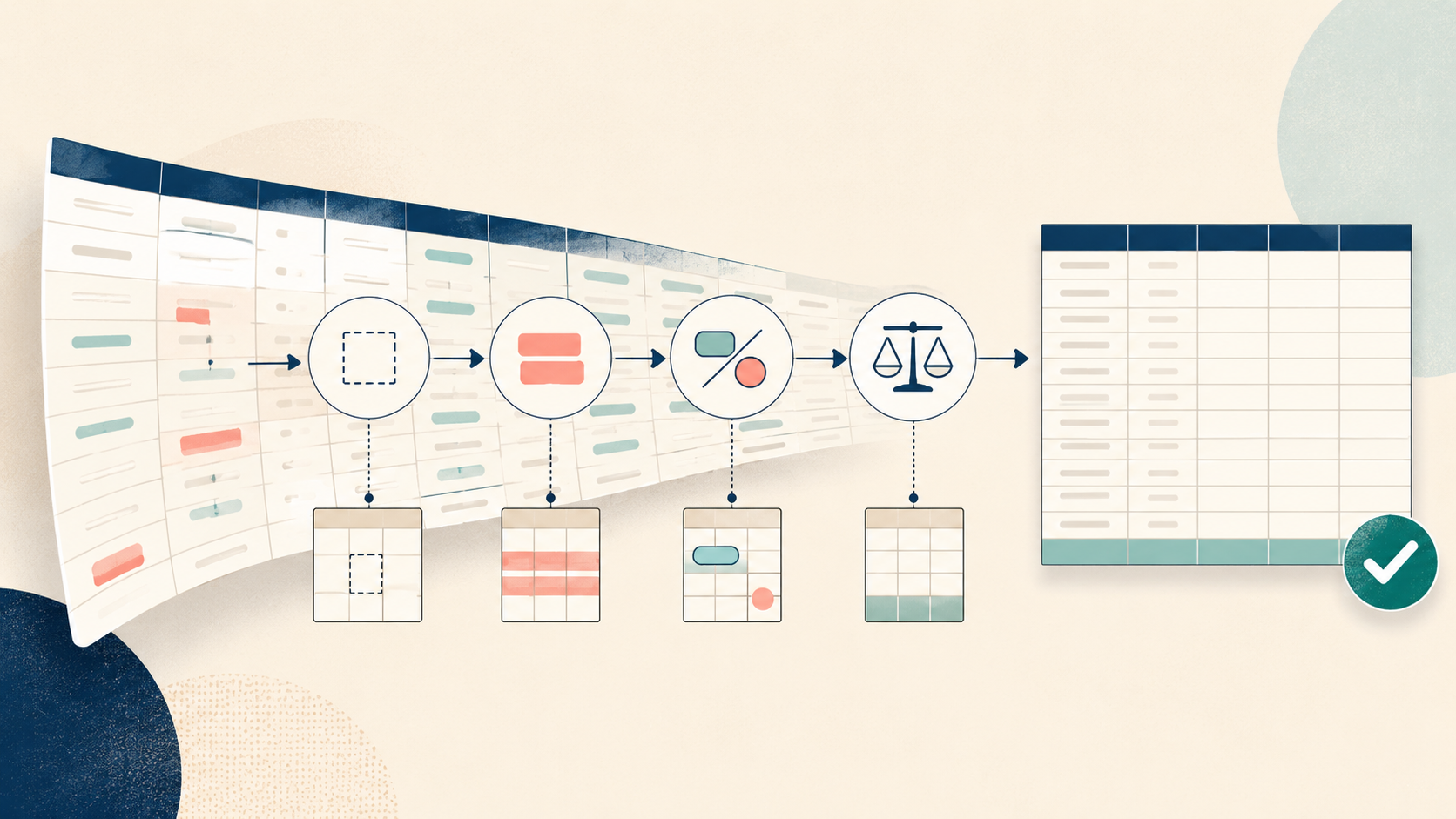
A polished chart can hide a broken spreadsheet. Before you ask ChatGPT what the numbers mean, ask whether the file deserves to be analysed at all. ChatGPT can inspect uploaded spreadsheets, create tables and charts, and run code-backed calculations. OpenAI also advises using clear column names and one record per row. Those capabilities are useful, but they do not remove your responsibility to check the method, assumptions and output.
Start with a data audit, not an insight request
The first question should not be “What trends do you see?” It should be “What could make this dataset misleading?” That changes the task from interpretation to quality control. It also creates a visible record of what was checked before anyone acts on a result.
The four-check audit
Completeness
Find blank required fields and distinguish true missing data from valid zeros or “not applicable” values.
Uniqueness
Identify repeated records using a business key such as order ID, invoice number or employee ID.
Consistency
Check dates, currencies, categories and numeric columns for mixed formats or impossible values.
Reconciliation
Compare row totals with a trusted control total, source report or independent calculation.
Worked example: a small order log
Imagine a 20-row order file with columns for Order ID, Date, Region, Units, Unit Price and Revenue. One order appears twice. Two revenue cells are blank. One date is stored as text. One row shows Revenue that does not equal Units multiplied by Unit Price. None of these issues requires advanced statistics; all can distort a summary.
A reviewable ChatGPT workflow
- 1
Prepare a safe copy
Remove or mask sensitive fields according to your organisation’s rules. Keep the original unchanged.
- 2
Describe the business rules
State which columns are required, what makes a row unique and which totals should reconcile.
- 3
Request an audit table
Ask for each issue with row reference, rule breached, severity and suggested next action.
- 4
Inspect the method
If code was used, review it. Ask ChatGPT to explain assumptions and show the calculation behind each flag.
- 5
Correct outside the analysis
Fix the source or a controlled working copy, then rerun the same checks before requesting trends.
Reading is a start. Practice makes it stick.
Start learningInspect this spreadsheet before analysing it. Do not correct any values yet. Check: (1) missing values in required columns [list them], (2) duplicate records using [business key], (3) inconsistent dates, categories and numeric types, and (4) whether [calculated field] equals [formula]. Return an issue table with row reference, evidence, severity and proposed action. Then show any code used and list your assumptions.
A compact issue table, followed by the exact checks performed and unresolved questions.
Replace the bracketed fields with rules from your real process. A generic “clean my data” request gives the model too much discretion.
Read the audit like a reviewer
Do not accept a flag just because it looks plausible. A blank delivery date may be correct for an open order. A repeated customer can be normal even when a repeated invoice is not. Review each issue against the meaning of the field, not only its appearance.
| Weak check | Decision-ready check | |
|---|---|---|
| Missing data | Count blanks | Name required fields and explain exceptions |
| Duplicates | Match whole rows | Use the process’s real business key |
| Types | Convert everything | Flag mixed formats before changing them |
| Totals | Trust the workbook | Reconcile with an independent control |
Keep data policy ahead of convenience
Use only files and fields your organisation permits in the approved workspace. Product plan, workspace settings and connected-source permissions can affect available features and data handling.
Try the audit in ten minutes
- Choose a small, non-sensitive spreadsheet and make a copy.
- Write one required-field rule, one uniqueness rule and one reconciliation rule.
- Run the reusable prompt and inspect the issue table.
- Open one flagged row in the original file and verify it manually.
- Save the final rules so a colleague can repeat the audit.
The useful habit is simple: establish whether the data is sound before asking for a story. When the checks are explicit and repeatable, ChatGPT becomes a second pair of eyes rather than a source of false confidence. Bokili’s short practice missions help teams rehearse this kind of real-work verification until it becomes routine.
Sources
- Data analysis with ChatGPT — OpenAI Help Center
- What types of files are supported? — OpenAI Help Center
- Managing data, sharing, and privacy in ChatGPT Business — OpenAI Help Center
Reading is a start. Practice makes it stick.
Bokili turns skills like this into ten-minute missions for your whole team, with instant feedback and progress you can see.
Start learningKeep reading

AI Training for Employees: Separate Drafts From Records
Teach a four-state path—Draft, Checked, Approved, Recorded—so polished AI output never becomes organisational fact by accident.
Use Gemini Notebook Mind Maps to Turn Policy Into Questions
Use a Gemini Notebook mind map as a question index for a long policy—then open the cited source before you trust any answer.

AI Training for HR: Build a Four-Part Policy Answer
Teach HR teams to separate the source, written rule, human discretion and next step before turning an AI draft into employee guidance.