
Use Gemini Notebook Mind Maps to Find the Policy Branch You Missed
Use a Gemini Notebook mind map to spot thin or missing policy branches, then verify the decisive point in the original source.
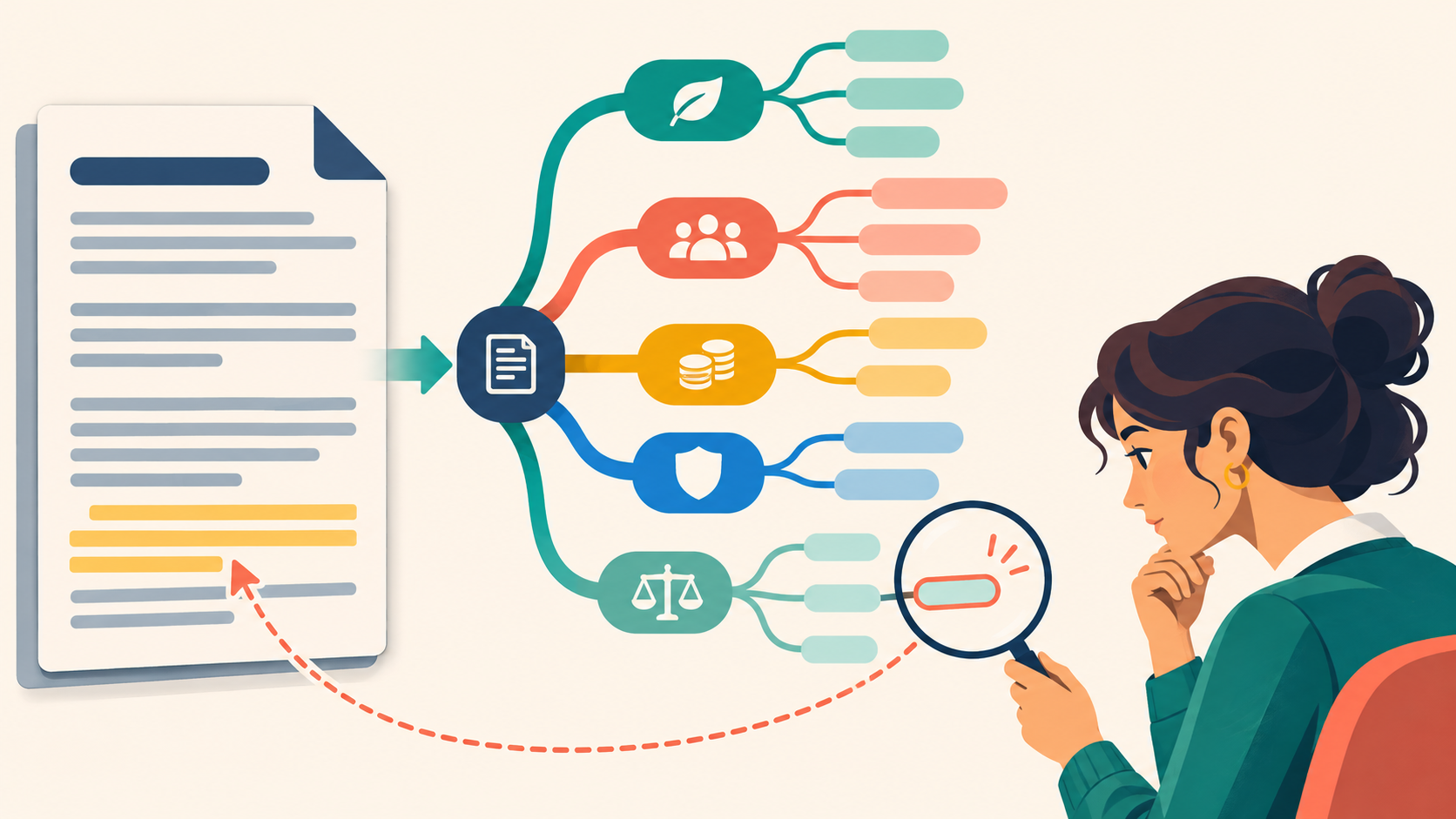
A policy summary can look complete while an entire branch has disappeared. Exceptions, regional variations, approval roles and review dates are easy to flatten into one smooth paragraph. Gemini Notebook mind maps give you a fast way to inspect the shape of a source before you trust a summary. The map is not proof. It is a navigation layer that helps you decide where to look next.
Google says Gemini Notebook mind maps visually summarise uploaded sources as a branching diagram. You can expand and collapse branches, select a node and ask questions about that topic. Google also warns that the tool can be inaccurate and that responses should be checked. That combination suggests a useful workplace habit: use the map to locate thin, crowded or missing branches, then return to the original source for evidence.
Use the map to inspect coverage, not to replace reading
A normal summary compresses information in a line. A mind map exposes hierarchy: main topics, subtopics and connections. This can reveal that one policy has ten branches for eligibility but only one small branch for appeals, or that a process section names steps without naming an owner. The visual shape does not prove that a topic is important or complete. It gives the reviewer a question worth checking.
| Quick summary | Mind-map coverage check | |
|---|---|---|
| Starting view | One fluent answer | The source structure and branches |
| Useful signal | Main message | Thin, crowded or disconnected topics |
| Evidence step | Easy to skip | Open the original source and read in context |
| Decision | Accept or rewrite the summary | Confirm, add, narrow or mark unresolved |
Use the MAPS loop
MAPS: from visual branch to verified point
M — Make the source set deliberate
Add only the approved, current documents needed for the question. Separate superseded versions and confirm that the files may be used in the tool.
A — Assess the branches
Generate the mind map and scan for thin branches, duplicated topics, isolated nodes and sections that carry a decision but little detail.
P — Probe one node
Select one node and ask a narrow question about scope, owner, exception, date or evidence. Keep the question tied to the selected sources.
S — See the source
Open the cited or original passage. Read the surrounding section and record whether the point is supported, contradicted or unresolved.
The first step matters because a mind map can only reflect the source set it receives. If the current policy sits beside an obsolete version, the map may blend both. If a regional annex is missing, no branch can recover it. Before generating anything, write down which document should control when sources conflict and who owns the active version.
Worked example: review a hybrid-work policy
Imagine an HR operations manager preparing a short manager guide from a hybrid-work policy and two approved annexes. The first summary covers eligibility, office days and equipment. It sounds clear. The manager generates a mind map and notices that the appeal process is a small branch under exceptions, while accessibility adjustments appear in a separate annex branch.
Reading is a start. Practice makes it stick.
Start learningThe manager selects the appeal node and asks which roles can receive an appeal, who reviews it and which deadline applies. The answer points to a policy section, but the manager opens the source and sees that the deadline applies only in one country. The guide is corrected: the global summary no longer presents the deadline as universal, and the regional annex is linked for local use.
Using only the selected policy sources, explain the selected branch in four lines: who it applies to, the rule, any exception, and the named owner or review route. Cite the source for each line. If the source set does not answer one part, write “Unresolved” instead of inferring it.
A short branch note with visible scope, rule, exception and owner, plus an unresolved marker where evidence is missing.
Open every cited passage. The mind map and chat answer are navigation aids, not approval evidence.
Do not ask the notebook to create a final policy from the map. That turns a coverage check back into a generation task. Keep the output small: one branch note, one source check and one decision about the guide. If the branch affects employment rights, safety, access or another high-impact matter, route interpretation to the qualified owner.
Choose branches with decision weight
The visually largest branch is not always the most important. Prioritise a branch when it changes who is covered, what is permitted, when work must stop, who approves an exception or which version applies. A tiny definition can control a whole procedure. A long background section may change nothing. Review for decision weight, not visual size.
Gemini Notebook can support inline citations and source-grounded chat, but the product still retrieves and generates an answer. Check the exact passage, date, scope and authority before using the result. On work accounts, follow your organisation’s approved-tool, sharing and data rules. Do not upload personal or confidential material simply because the visual format feels harmless.
- Choose one current, non-sensitive policy or procedure with a known owner.
- Add only the approved source and any essential current annex.
- Generate a mind map and mark one thin or disconnected branch that affects a decision.
- Select that node and ask for scope, rule, exception and owner.
- Open the original passage and record supported, contradicted or unresolved.
- Change one sentence in your guide, or assign the unresolved point to the right reviewer.
Connect the visual check to a repeatable habit
Pair this method with Bokili’s one-claim source test when a sentence needs close evidence review: https://bokili.com/en/learn/gemini-notebook-one-claim-one-source. Use the clean-context drill when you need to test whether a method survives without hidden history, and the separate acceptance-test guide when the reviewer needs explicit criteria. Bokili’s HR and L&D pathway at https://bokili.com/en/for-hr turns these checks into short, role-based practice.
A mind map earns its place when it changes what you inspect. Generate the structure, find the branch with decision weight and return to the source. The useful outcome is not a prettier view of the policy. It is one fewer exception, owner or scope condition lost in the summary.
Practise this in Bokili
Turn what you just read into a ten-minute mission.
- Start learning
Test one claim against one source
Practise a narrow evidence check after locating the decisive branch.
- Start learning
Bokili for HR and L&D
Build role-based AI skills through short workplace missions.
Sources
- Use Mind Maps in Gemini Notebook — Google
- Learn about Gemini Notebook — Google
- Gemini Notebook is now Gemini Notebook — Google
Reading is a start. Practice makes it stick.
Bokili turns skills like this into ten-minute missions for your whole team, with instant feedback and progress you can see.
Start learningKeep reading

AI Training for HR: Keep Health Inference Out of Absence Summaries
Train HR teams to produce a minimal operational absence summary without exposing health details, inventing causes or letting AI make a people decision.

Allocate AI Licences to Task-Ready Work, Not Waiting Lists
Use four readiness gates to allocate scarce AI access to work with an approved input, clear outcome, review owner and support route.

AI Skills for Employees: Calibrate Confidence Before Checking
Train employees to record confidence before AI advice, verify the decisive claim and learn from the gap between prediction and evidence.